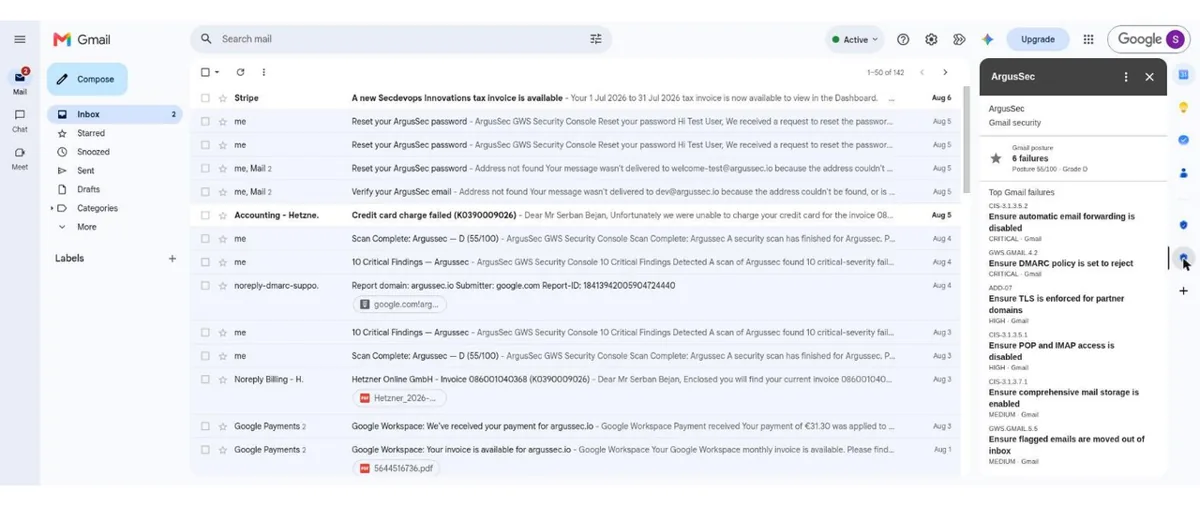
ArgusSec passed Google's review and is now listed on the Google Workspace Marketplace. The listing is an add-on that puts the results of your ArgusSec audits inside the apps your admins open every day: a findings panel in Gmail and Drive, an import button in Sheets, and a bot in Google Chat that answers questions about your posture. The audit engine itself has not moved. It is the same open-source auditor with 227 checks across CIS, CISA SCuBA, Google and community frameworks, running in ArgusSec Cloud against your tenant. The add-on is the part that brings the answers to you.
Why a Marketplace Listing Matters
Admins have good reasons to distrust anything that asks for access to their Workspace. A Marketplace listing means Google has reviewed the app, verified the OAuth consent screen, checked every requested scope against what the code does, and watched a recorded walkthrough of each surface. It also means installation is a known process: a Workspace admin can install ArgusSec for the whole domain from the Admin console, or an individual user can add it to their own account, and either way the consent screen lists exactly what is granted.
For a security product, the review is more than a formality. It is the first time a third party checked that our access matches our claims. We will come back to what the add-on asks for below, because it is less than most people expect.
What You Get Inside Workspace
Gmail and Drive sidebars
Open the ArgusSec icon in the Gmail side panel and you get the Gmail section of your latest audit: posture score, the number of failing checks, and the top failures ordered by severity, each with its check ID and a link to the remediation steps. The Drive panel does the same for sharing, external access and content security checks. The panels read from your most recent scan, so an admin who spends the day in Gmail sees the state of DMARC, forwarding, POP and IMAP without opening the dashboard.
Sheets import
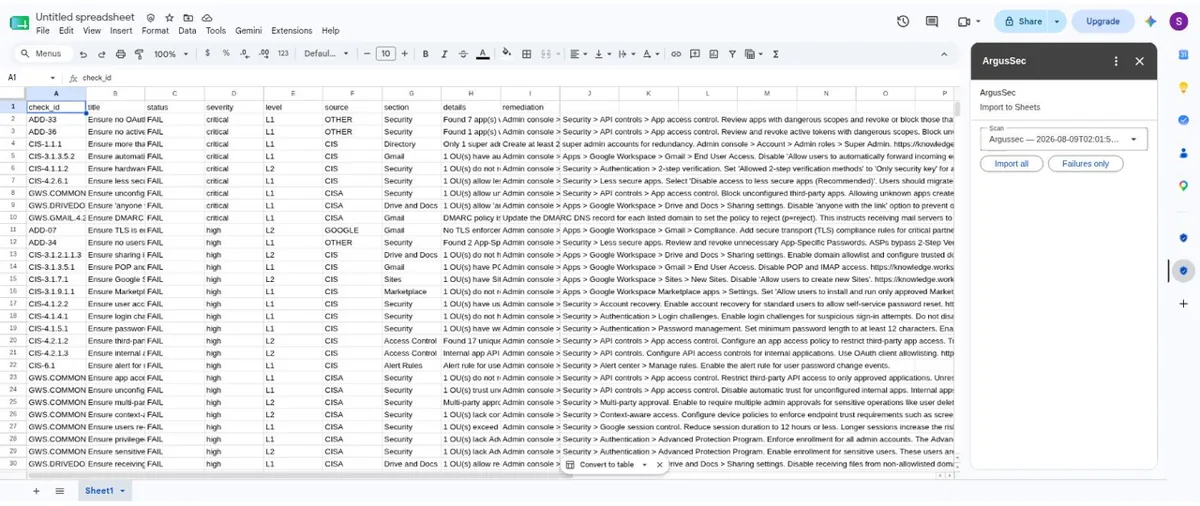
Compliance teams and external auditors work in spreadsheets. The Sheets panel lists your scans, and one click on Import all or Failures only writes the report into the active sheet: one row per check with ID, title, status, severity, level, framework, section, details and remediation. No CSV export, no upload. The add-on only touches the spreadsheet you have open and only when you click the button.
Google Chat
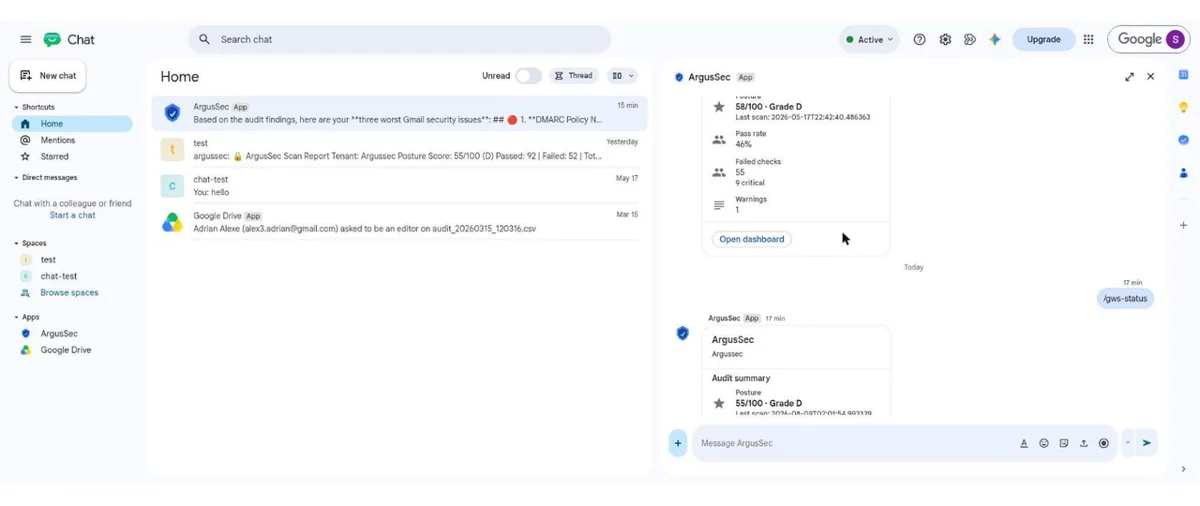
Add the ArgusSec app in Chat and you get four slash commands plus a free-text channel to the AI Analyst.
-
/gws-status· Posture summaryScore, grade, pass rate, failed and critical counts from the latest scan, with a button to open the dashboard.
-
/gws-audit· Start a scanQueues a new audit of your default tenant. Results arrive in the dashboard and in the next status card.
-
/gws-findings [section]· Top failuresThe worst findings, optionally filtered to one section such as
gmailordrive. -
/gws-remediate <check_id>· Fix stepsThe remediation steps for one check, with the Admin console path.
Anything that is not a command goes to the AI Analyst. Ask "what are my three worst Gmail issues?" or "how do I enforce phishing-resistant MFA?" and it answers from your scan data, not from a generic knowledge base. This is the same analyst that runs in the ArgusSec dashboard, hosted in the EU, with no API key to manage.
What the Add-on Asks For
This is the part we are proudest of. The add-on requests five scopes, and none of them is classified by Google as sensitive or restricted. It does not read your email. It does not browse your Drive. It cannot see any file you have not opened it in.
| Scope | Used for |
|---|---|
| userinfo.email, openid | Matching the signed-in Google user to their ArgusSec account. Nothing else from the profile. |
| gmail.addons.execute | Required by Google to render any panel in Gmail. It grants no access to message content. |
| spreadsheets.currentonly | Writing rows into the sheet you have open when you click Import. Only that sheet. |
| drive.file | Google's per-file grant so the Sheets panel can reach the spreadsheet you opened it in. No other Drive content. |
The audit data comes from somewhere else entirely: the read-only service account you connect once in the ArgusSec console, the same setup the open-source CLI uses. Before submitting, we removed four scopes that an earlier version of the manifest requested and the code never used. The result is an add-on that needs neither Google's sensitive-scope verification nor a CASA security assessment, because there is nothing in it to assess at that level. For a tool whose job is to audit permissions, requesting the minimum felt like the only defensible choice.
How to Install
-
1
Open the ArgusSec listing and click Install. Workspace admins can choose a domain-wide install for everyone, or for selected organizational units.
-
2
Sign up at app.argussec.io with the same Google account and connect your tenant. The service-account setup takes about two minutes and is guided in the console.
-
3
Run your first audit. It is free and needs no credit card.
-
4
Open Gmail, Sheets or Chat. The ArgusSec icon is in the side panel, and the Chat app answers
/gws-help.
The add-on works with any ArgusSec Cloud account, including the free first audit. A subscription is €15 per month, or €12.50 per month billed yearly, and covers up to three Workspace tenants. Full details are on the pricing page.
What Stays the Same
The open-source auditor is unchanged. Every one of the 227 checks the add-on reports on is in the gws-auditor repository under the AGPL, and you can read the logic behind any finding the panel shows you. The add-on is a thin layer of cards over the ArgusSec Cloud API. If you prefer the CLI and a cron job, nothing here takes that away.
What is next: the Chat bot will gain commands for muting and accepting risk from the conversation, and we are looking at a Calendar panel that flags meetings with external attendees. If you install the add-on and something is missing, tell us. And if it earns a place in your day, a review on the listing helps the next admin find it.